NEW: Connect your AI assistant to Concerto with MCP →

Music collaboration for works in progress

Make the back-and-forth the easy part of finishing your music

One place to play drafts for cowriters, bandmates, and clients, and hear exactly what they mean

Start free with 5 GB of storage and no credit card. Reviewers never pay.

Time-synced comments

Keep the feedback where the sound is

“Something's off around the second chorus” becomes a comment pinned at 2:41 on the version it's about, next to the conversation that resolves it.
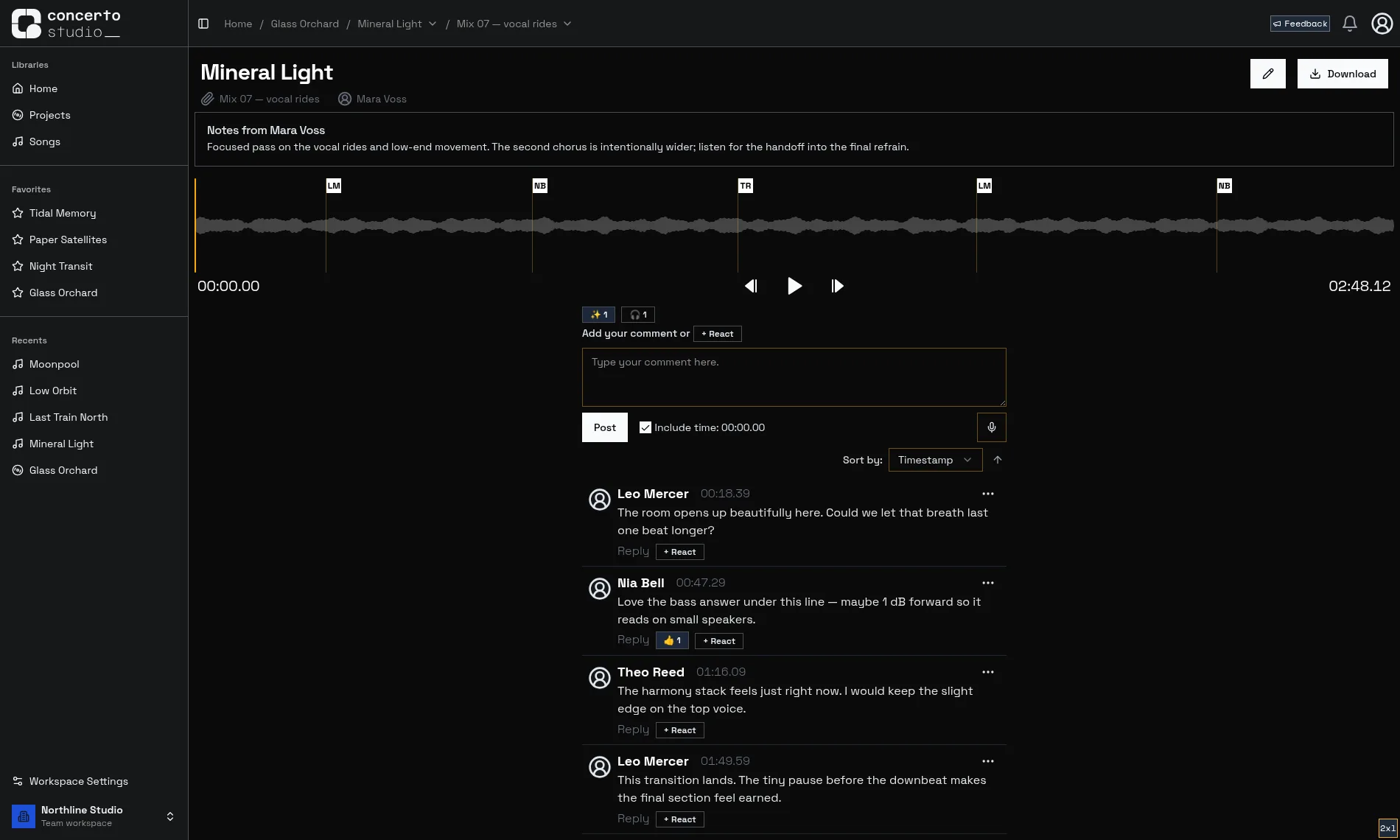
  1. A track holds all of its versions, so everyone hears the same mix and nobody hunts for the latest file.

  2. Version notes tell reviewers what you worked on and what to listen for before they press play.

  3. Every comment leaves a marker at its timestamp. Click one to jump to the moment it's about.

  4. Comment at the current time, record a voice memo when humming is faster than words, or drop a reaction.

  5. Replies and reactions stay threaded under each note, next to the sound it describes.

More about time-synced comments

Feedback to done

Built for the space between exports

Concerto isn't a DAW or a distribution platform. It handles the part in between: share a draft, hear what people think, act on it, and send the next one.

Before

Bounce a mix from your DAW

In Concerto

  1. Upload a version

    Drop in the bounce and note what changed since the last one.

  2. Collect feedback

    Collaborators listen in the browser and comment at exact timestamps.

  3. Turn notes into todos

    Any comment worth acting on becomes a todo on the track's task list.

  4. Resolve and repeat

    Finishing a todo resolves its comment. Upload the next version and go again.

After

Release it wherever you already do

Stems & mixer

Let reviewers hear the parts, not just the sum

Upload stems you bounced yourself, or auto-split a track into vocals, drums, bass, and the rest. Anyone you share with can solo, mute, and balance them right in the browser, with nothing to install.

Stems and automatic separation are part of the Ensemble and Symphony plans. Reviewers can use the mixer for free.

More about stems and the mixer

What you hear

  • Vocals
  • Drums
  • Bass
  • Other

A home for works in progress

Organized without the busywork

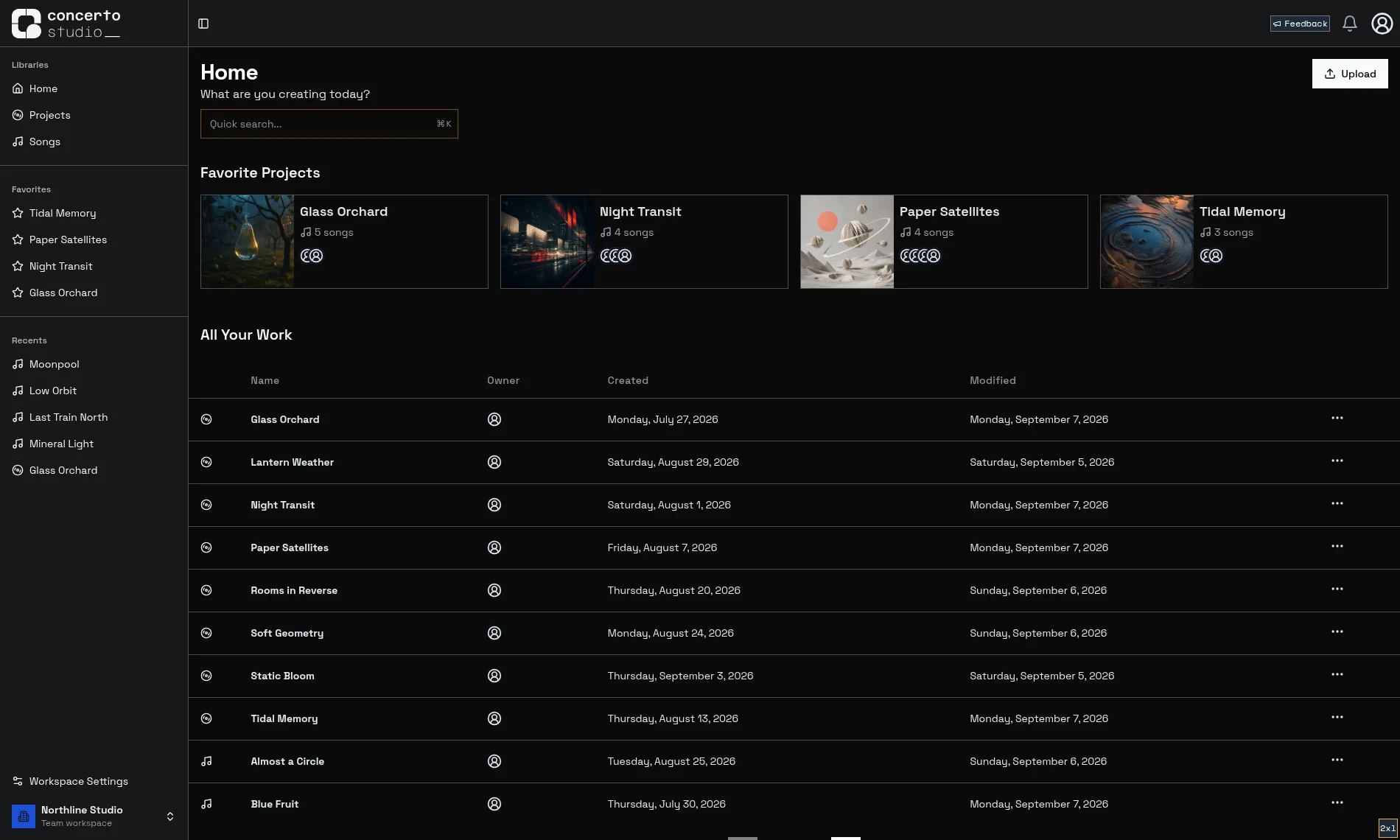
Projects, tracks, versions, attachments, album art, and notes, all where they belong instead of scattered across chats, drives, and inboxes.

Version history
Every track keeps its versions in order, with notes about what changed. No more FINAL_final_v3.wav.
Team workspaces
Keep your own projects in a personal workspace, and give your band, production crew, or clients a shared one.
Private sharing
Only the people you share with can see your work, and you choose per project, track, or version.
See every feature

Concerto home page showing recent projects, favorites, and the workspace sidebar

Simple pricing

Free to start, upgrade when you grow

Try Concerto with your real projects before paying anything. Upgrade a workspace when you need more room or advanced tools.

Solo

Free
  • 5 GB storage with unlimited uploads
  • 1 editor and unlimited reviewers
  • Time-synced comments & version history
Recommended

Ensemble

$12/mo
or $120/yr, two months free
  • Everything in Solo
  • 250 GB storage (50× Solo)
  • 5 editors and unlimited reviewers
  • Stem uploads with an in-player mixer
  • Automatic stem separation
  • Version comparison

Symphony

$29/mo
or $290/yr, two months free
  • Everything in Ensemble
  • 1 TB storage
  • 15 editors and unlimited reviewers
  • 4× Ensemble's storage, 3× the editors

Prices are per workspace. See pricing details →

FAQ

Frequently asked questions

Something else on your mind? Ask me directly.

What is Concerto?
Concerto is a web app for collaborating on music that's still in progress. You upload tracks, share them with collaborators or clients, and collect feedback tied to exact timestamps instead of chasing notes through texts, emails, and voice memos.
Is Concerto free?
Yes. The Solo plan is free and includes 5 GB of storage, one editor, unlimited reviewers, time-synced comments, and version history. Ensemble ($12/month or $120/year, per workspace) includes 250 GB of storage, five editor seats, unlimited reviewers, stem uploads with an in-browser mixer, automatic stem separation, and version comparison. Symphony ($29/month or $290/year) includes everything in Ensemble with 1 TB of storage and fifteen editor seats.
Do my collaborators need to pay?
No. People you share with just need a free account. They can listen in full quality, comment at timestamps, and even play with the stem mixer on tracks that have stems.
Does Concerto replace my DAW?
No. Concerto covers the space between exports: sharing drafts, collecting feedback, and keeping track of versions. You keep making music in whatever tools you already use.
Can Concerto split a track into stems?
Yes. On an Ensemble or Symphony workspace you can auto-split any uploaded track into vocals, drums, bass, and the rest, or upload stems you bounced yourself. Anyone you share with can mix them in the browser.
Is my unreleased music private?
Yes. Everything you upload is private by default and visible only to the people you share it with, per project, track, or version. Public links that play without an account exist, but they are off until a workspace admin and a project admin both turn them on.
Who makes Concerto?
I'm Robert, and I build Concerto through my small, independent company, Archa Solutions, LLC. I started it because feedback on mixes kept getting lost in group chats. I don't sell or share user data, and I read every message, so send me a note if something is missing.
Can I connect an AI assistant to Concerto?
Yes. Concerto has an MCP server, free on every plan, that lets an assistant you have signed in and approved read feedback, post comments, manage todos, and upload versions on your behalf. Workspace admins can make agent access read-only.

Your next track deserves better than a group chat

Store up to 5 GB with unlimited uploads and reviewers, completely free.

Sign up
Also try our free practice app, Shed →